Endpoint inventory and Windows 11 readiness
A tool that merges device exports from five systems into one row per device, flags security gaps and bad asset records automatically, and tracks the Windows 11 migration.
Problem
Device data lived in five separate systems: endpoint management for staff PCs, a lab inventory system for classroom machines, the EDR platform, a Mac management tool, and the IT asset management system. Each one saw only part of the picture, so simple questions were hard to answer.
- Which active devices are missing security protection?
- Which security licenses are assigned to machines that no longer exist?
- Which devices may be lost or stolen?
- Which asset records say “in storage” for a computer someone uses every day?
- How far along is the Windows 11 migration, and which machines can’t make the jump?
My role
I designed and built it as an Endpoint Security Analyst.
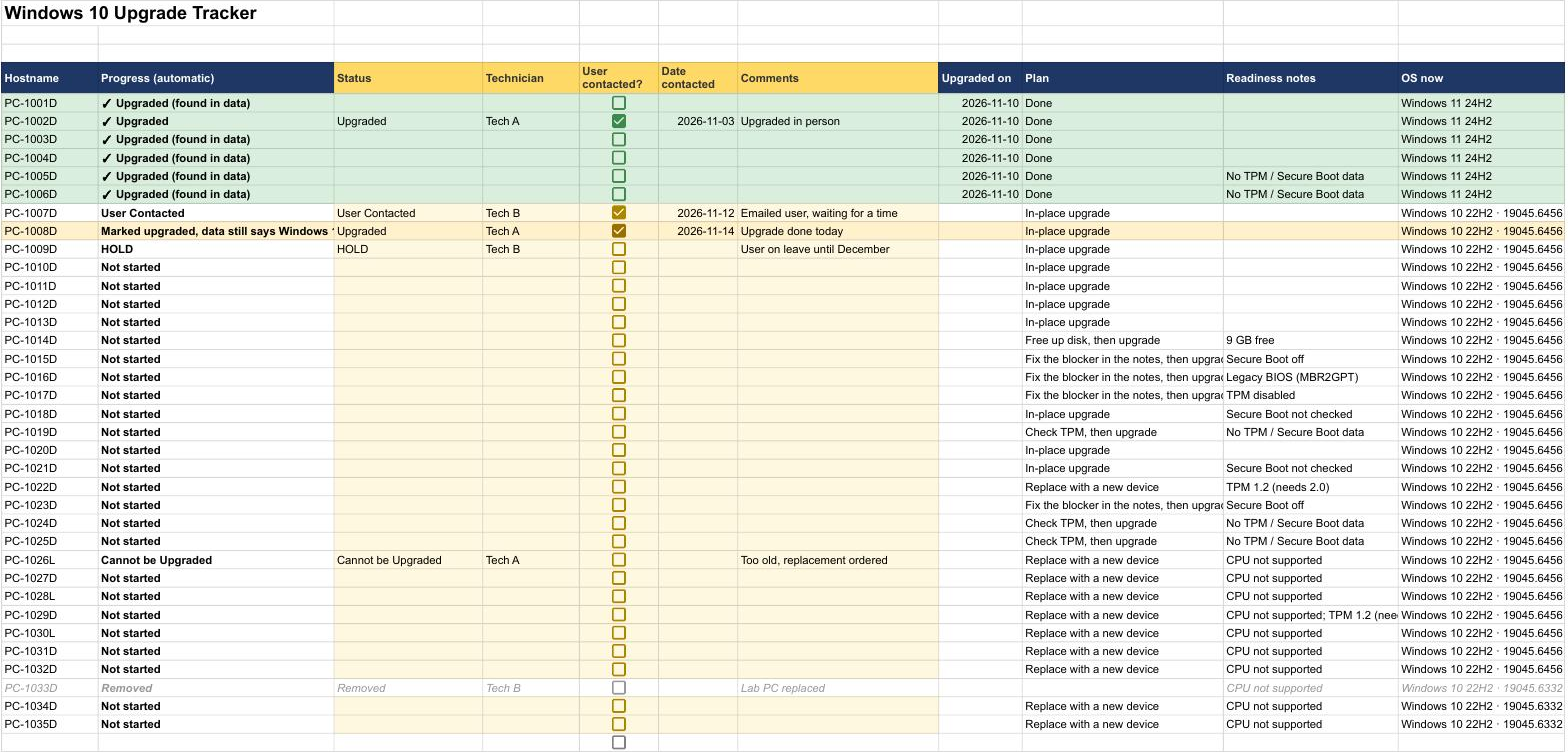
Before that, at Level 3, I worked on the migration hands on: in-place upgrades, hardware replacements, and the tracking sheets and user communication that kept the rollout coordinated. I built that first upgrade spreadsheet, and it had to be updated by hand. This tool replaced it with one that keeps itself current.
Tools
JavaScript for the offline dashboard. Spreadsheet formulas for the team tracker: array formulas, conditional logic, filter views, and dashboards, with no scripts. SQL and PowerShell for reporting. The input is the raw exports from the five systems.
What I did
I built it twice, for two different jobs.
- An offline dashboard. A self-contained web app that reads the raw exports, matches each device across all five systems by serial number first and hostname second, and flags problems. It runs entirely in the browser with no network access, no stored credentials, and no APIs, so device data never leaves the machine.
- A shared tracker. A spreadsheet built only from formulas, with no scripts, so several people can work in it at once. When fresh exports are imported, every view updates on its own.
What it does:
- Merge each device’s records into a single row that shows what each system knows and where they disagree.
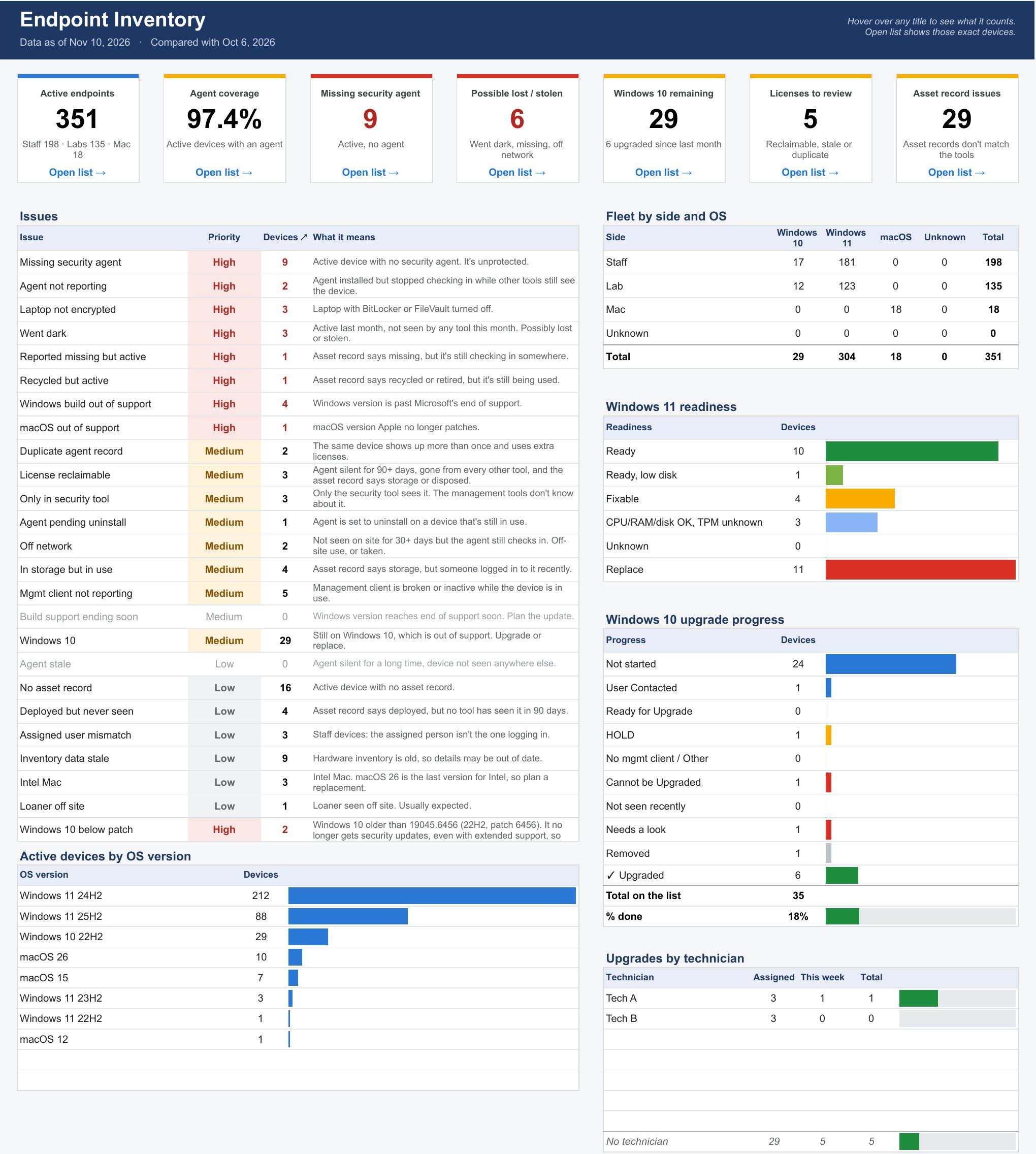
- Run 24 automated checks, ranked by priority. Examples: active devices with no security agent, agents that stopped reporting, unencrypted laptops, devices that went dark, recycled assets still in use, expired OS builds, and asset records that don’t match reality.
- Find security agents on devices that are confirmed gone, so those licenses can be reclaimed instead of renewed.
- Compare each month to the last to catch devices that disappeared or only check in from off the network.
- Show a dashboard of headline numbers, each colored by status and explained in plain language. One click on any number opens the exact devices behind it. It also shows progress per technician and a monthly trend.
- Check every import. If a vendor renames a column in an export, the tool flags it and lets you remap it without touching a formula.
Windows 11
- Every Windows 10 device is graded Ready, Fixable, or Replace from its CPU, RAM, disk, TPM, and Secure Boot status.
- Technicians log contact and progress in shared columns.
- Devices that users upgraded on their own are detected and marked automatically, with the date.
- Machines below the minimum patch level for extended support are flagged separately, so the riskiest ones get upgraded first.
Changes
Every change is built and tested on dummy data, rehearsed on a throwaway copy, and then applied to the live tracker by following a written, step-by-step change pack.
Result
- Five separate exports become one repeatable view of every device.
- The hand-updated upgrade spreadsheet I built at Level 3 was replaced by one that keeps itself current.